Permanent archive copy
Originally published by Retro Recall on 11 March 2025. Preserved here by the author for long-term access.
We often forget when we look down at our keyboards that, although they look more or less as they have since the 1970s, they are very different these days from those beige things we may have grown up with and that featured in movies such as WarGames.
The advent of the mechanical keyboard has brought many quality-of-life improvements to our word-entering pals. Only the cheapest of keebs now have that horrid spongy feel of yesteryear’s membranes. Even the shape of the keycaps has changed and become more standardised.
With that said, not everything from the bygone era was bad. The look and charm of retro is very much in these days, so imagine if you could take a prominent accessory manufacturer and get them to create a keyboard that looked like an iconic slab of plastic from yesteryear but magically infuse it with today’s technology. Would that work for you? Well, hello 8BitDo’s Retro Mechanical Keyboard C64 Edition.
Commodore’s classic C64 computer holds a dear place in many hearts to this day. The dark browns and beiges of the original “breadbin” design are instantly recognisable, but imagine stuffing one with proper Kailh Box White switches, Bluetooth and a 2.4G adapter and you are getting close to realising a dream.
Now add in a hot-swappable PCB in case those Box Whites aren’t for you and throw in some slightly weird buttons and a joystick, and now we are talking.
Keyboard goes clickety-clack
The first thing you will notice is that the sound is clicky—a good thing—and quite echoey and reminiscent of the way keyboards used to sound in the old days, only louder. At first, for the first few minutes—and I will admit to being a bit of a keyboard snob—I didn’t like it compared to the Ducky I was currently using, but over the past few weeks I have learned to not just like the noise it makes, but really like it. I have been asked from downstairs why I type so loudly and I see that as a good thing.
Unfamiliar keycaps
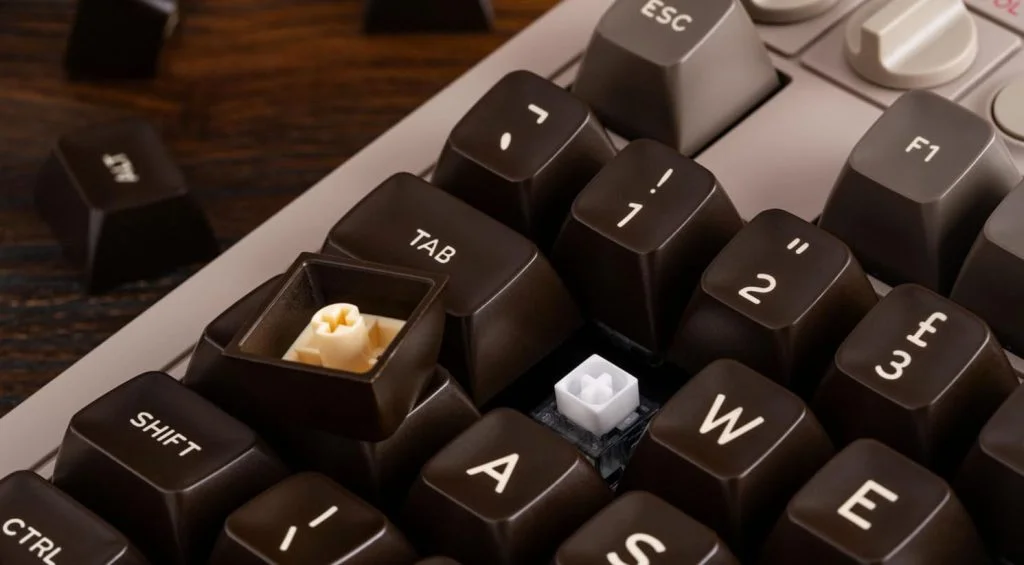
The included brown C64-style double-shot ABS SA-profile keycaps are where this keyboard may hit the rocks with certain users, especially those not familiar with the look and feel of the “olden days”. We have become so used to ergonomically barely feeling the keys under our fingers that, even after a few weeks of writing a lot on this keyboard, the slightly raised, harsh edges of each key feel unusual. I don’t find it unpleasant. I actually quite like the more tactile feel it gives me, and I think many people will too once they have got used to just how different they feel.
The accessories—buttons and joystick
You may be aware that previous iterations in 8BitDo’s retro keyboard line have also come with two giant red buttons that look more ready for firing nukes than being traditional macro buttons. They plug into the back of the keyboard via a 3.5mm jack plug, which is odd in itself, although not as odd as the joystick—but more on that in a second.
The buttons can be assigned via the 8BitDo software to a variety of functions and even come with stickers you can use as reminders. Initially I had them set to play and stop my music, but found I kept catching them and my music would come roaring out when neither I, nor the rest of the household, expected it.
I have eventually settled on one of them turning my office lights on and off via Home Assistant. It took a little setting up but is quite cool. I have not found a use for the second button yet.
The joystick is a different beast altogether. It attaches via two 3.5mm jacks to the keyboard and can be programmed in the same way as the buttons. Because of this, it doesn’t register as a game controller and it doesn’t have a fire button, although the theory is obviously to use it with the two massive nuke buttons. Yes, I could set it to move up, down, left and right and use it for playing simple games in an emulator—I guess this is probably the idea—but I have better hardware for that which I am not ready to give up at this point. I just wish it was a USB game controller.
It looks nice, suitably increases the retro vibe and is attached magnetically to the buttons, but, well, it is kind of back in the box for me.
Other features
A few other points to mention. It can be connected via USB-C as well as wireless, and you can seamlessly connect to various things and switch between them with a dial. The dongle is housed and attached magnetically under the keyboard, and I found the keyboard to be of a lovely weight that doesn’t move around at all.
Final conclusion
The typing experience for me is what sets the 8BitDo C64 Edition (opens in a new tab) apart and is the reason it is still on my desk as my word weapon of choice. Everything, right down to the C64-esque red LED power-light dome, screams out to my love of old gaming gear. This all means it’s not for everybody, but then, it’s not aimed at everybody, is it?
It is squarely aimed at retro lovers, and a niche of us at that, and it ticks every single one of those boxes with aplomb, from feel to connectivity to its gorgeous looks.
Sure, I could live without the buttons and joystick and would rather have the cool matching number pad included instead, but they are a talking point if nothing else.
If you have even considered this as your next board for its aesthetics, I wholly recommend you make the jump and give one a good home. You will not be disappointed.